%20--%3e%3csvg%20version='1.1'%20id='Layer_1'%20xmlns='http://www.w3.org/2000/svg'%20xmlns:xlink='http://www.w3.org/1999/xlink'%20x='0px'%20y='0px'%20viewBox='0%200%20120.17%2045.43'%20style='enable-background:new%200%200%20120.17%2045.43;'%20xml:space='preserve'%3e%3cg%3e%3cpath%20d='M32.33,0v16.13c0,2.21-0.42,4.3-1.26,6.26c-0.84,1.97-2,3.7-3.49,5.18c-1.49,1.49-3.2,2.65-5.15,3.49%20c-1.94,0.84-4.04,1.26-6.3,1.26c-2.21,0-4.3-0.42-6.26-1.26c-1.97-0.84-3.68-2-5.15-3.49c-1.46-1.49-2.62-3.21-3.46-5.18%20C0.42,20.42,0,18.34,0,16.13V0h6.41v16.13c0,1.34,0.25,2.62,0.76,3.82c0.5,1.2,1.2,2.24,2.09,3.13c0.89,0.89,1.92,1.58,3.1,2.09%20c1.18,0.5,2.44,0.76,3.78,0.76c1.34,0,2.62-0.25,3.82-0.76c1.2-0.5,2.24-1.2,3.13-2.09c0.89-0.89,1.58-1.93,2.09-3.13%20c0.5-1.2,0.76-2.47,0.76-3.82V0H32.33z'%20fill='%232563eb'%20/%3e%3cpath%20d='M50.4,0.14c2.26,0,4.36,0.42,6.3,1.26c1.94,0.84,3.66,1.99,5.15,3.46c1.49,1.46,2.65,3.17,3.49,5.11%20c0.84,1.94,1.26,4.04,1.26,6.3c0,2.21-0.42,4.3-1.26,6.26c-0.84,1.97-2,3.7-3.49,5.18c-1.49,1.49-3.2,2.65-5.15,3.49%20c-1.94,0.84-4.04,1.26-6.3,1.26h-9.72v12.96h-6.41V16.27c0-2.26,0.42-4.36,1.26-6.3c0.84-1.94,1.99-3.65,3.46-5.11%20c1.46-1.46,3.18-2.62,5.15-3.46C46.1,0.56,48.19,0.14,50.4,0.14z%20M54.22,25.31c1.2-0.5,2.24-1.2,3.13-2.09%20c0.89-0.89,1.58-1.93,2.09-3.13c0.5-1.2,0.76-2.47,0.76-3.82c0-1.34-0.25-2.6-0.76-3.78c-0.5-1.18-1.2-2.21-2.09-3.1%20c-0.89-0.89-1.93-1.58-3.13-2.09c-1.2-0.5-2.47-0.76-3.82-0.76c-1.34,0-2.6,0.25-3.78,0.76c-1.18,0.5-2.21,1.2-3.1,2.09%20c-0.89,0.89-1.58,1.92-2.09,3.1c-0.5,1.18-0.76,2.44-0.76,3.78v9.79h9.72C51.74,26.06,53.02,25.81,54.22,25.31z'%20fill='%232563eb'/%3e%3cpath%20d='M94.03,20.95l4.54,4.54l-2.23,2.23c-1.54,1.54-3.29,2.71-5.26,3.53c-1.97,0.82-4.03,1.22-6.19,1.22%20c-2.16,0-4.22-0.41-6.19-1.22c-1.97-0.82-3.72-1.99-5.26-3.53c-1.58-1.58-2.76-3.37-3.53-5.36c-0.77-1.99-1.15-4.02-1.15-6.08%20c0-2.06,0.38-4.08,1.15-6.05c0.77-1.97,1.94-3.74,3.53-5.33s3.37-2.77,5.36-3.56c1.99-0.79,4.02-1.19,6.08-1.19%20c2.06,0,4.09,0.4,6.08,1.19c1.99,0.79,3.78,1.98,5.36,3.56l2.23,2.23L80.64,25.06c1.82,0.91,3.75,1.21,5.8,0.9%20c2.04-0.31,3.83-1.24,5.36-2.77L94.03,20.95z%20M77.98,9.36c-1.92,1.92-2.88,4.22-2.88,6.91c0,1.49,0.33,2.9,1.01,4.25%20c0.58-0.58,1.45-1.45,2.63-2.63c1.18-1.18,2.42-2.42,3.74-3.74c1.32-1.32,2.59-2.58,3.82-3.78c1.22-1.2,2.17-2.14,2.84-2.81%20c-1.83-0.91-3.76-1.22-5.8-0.94C81.3,6.91,79.51,7.82,77.98,9.36z'%20fill='%232563eb'%20/%3e%3cpath%20d='M120.17,0v6.41h-3.24c-1.35,0-2.61,0.25-3.78,0.76c-1.18,0.5-2.21,1.2-3.1,2.09c-0.89,0.89-1.58,1.92-2.09,3.1%20c-0.5,1.18-0.76,2.44-0.76,3.78v16.2h-6.48v-16.2c0-2.26,0.42-4.36,1.26-6.3c0.84-1.94,2-3.65,3.49-5.11%20c1.49-1.46,3.21-2.62,5.18-3.46c1.97-0.84,4.06-1.26,6.27-1.26H120.17z'%20fill='%232563eb'/%3e%3c/g%3e%3c/svg%3e)

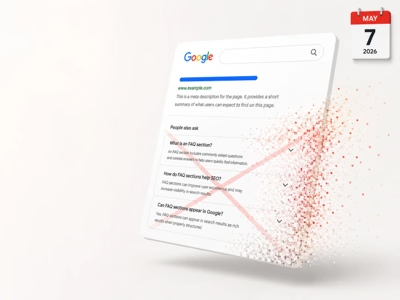
FAQ Schema (FAQPage) is a type of structured data that allows you to display questions and answers directly in Google search results. Proper implementation can significantly increase your page’s visibility and CTR, but Google has introduced important limitations you need to know.
What is FAQ Schema?
FAQPage is a Schema.org type that marks a page containing a list of questions and answers on a specific topic. Google uses this data to display expandable FAQ sections directly in search results (SERP).
What Does an FAQ Rich Result Look Like?
When Google displays an FAQ rich result, users see:
- Page title and description (standard result)
- Expandable questions below the description
- Answers inline when clicking a question
- Option to expand all questions
This format can increase your SERP real estate by 2-3 times!
Important Changes in 2023
In August 2023, Google significantly limited FAQ rich results display:
Before the Change (until August 2023)
- FAQ rich results displayed for all pages
- Very popular way to increase visibility
- Widely used by SEOs
After the Change (from August 2023)
- FAQ rich results only for government and medical pages with high authority
- Regular commercial pages do not receive FAQ snippets
- HowTo rich results also limited
What Does This Mean for Your Site?
- Commercial sites - FAQ Schema is still worth implementing (helps Google understand content), but don’t expect SERP display
- Government sites (.gov) - full FAQ rich results
- Medical sites - potentially FAQ rich results (requires high authority)
- Educational sites - possible FAQ rich results
FAQ Schema Implementation
Despite limitations, FAQ Schema is worth implementing because:
- Helps Google better understand content
- Can influence Featured Snippets
- Prepares the page for potential rich results restoration
- Improves content structure
Basic JSON-LD Implementation
{
  "@context": "https://schema.org",
  "@type": "FAQPage",
  "mainEntity": [
    {
      "@type": "Question",
      "name": "What is SEO?",
      "acceptedAnswer": {
        "@type": "Answer",
        "text": "SEO (Search Engine Optimization) is the process of optimizing a website to improve its visibility in organic search results on Google and other search engines."
      }
    },
    {
      "@type": "Question",
      "name": "How much does SEO cost?",
      "acceptedAnswer": {
        "@type": "Answer",
        "text": "SEO costs depend on many factors: industry competitiveness, website condition, scope of work. Typical prices range from $500 to $5,000 per month for small and medium businesses."
      }
    },
    {
      "@type": "Question",
      "name": "How long does SEO take?",
      "acceptedAnswer": {
        "@type": "Answer",
        "text": "First SEO results are typically visible after 3-6 months. Full results and stable rankings are usually achieved after 6-12 months of systematic efforts."
      }
    }
  ]
}
HTML to Inject
<script type="application/ld+json">
{
  "@context": "https://schema.org",
  "@type": "FAQPage",
  "mainEntity": [
    {
      "@type": "Question",
      "name": "Question 1?",
      "acceptedAnswer": {
        "@type": "Answer",
        "text": "Answer to question 1."
      }
    }
  ]
}
</script>
Answers with HTML Formatting
Answers can contain basic HTML:
{
  "@type": "Question",
  "name": "What are the benefits of SEO?",
  "acceptedAnswer": {
    "@type": "Answer",
    "text": "<p>The main benefits of SEO are:</p><ul><li>Increased organic traffic</li><li>Higher conversions</li><li>Building brand authority</li><li>Long-term results</li></ul><p>Learn more on <a href='https://example.com/seo'>our SEO page</a>.</p>"
  }
}
Allowed HTML tags in answers:
<p>- paragraphs<br>- line breaks<ul>,<ol>,<li>- lists<a href="">- links<b>,<strong>- bold<i>,<em>- italic<h2>-<h6>- headings
Google Requirements for FAQ Schema
Content Must Be Visible
FAQ must be visible on the page. You cannot add Schema for content that doesn’t exist in HTML.
<!-- FAQ section on page -->
<section class="faq">
  <h2>Frequently Asked Questions</h2>

  <div class="faq-item">
    <h3>What is SEO?</h3>
    <p>SEO is the process of optimization...</p>
  </div>

  <div class="faq-item">
    <h3>How much does SEO cost?</h3>
    <p>Cost depends on many factors...</p>
  </div>
</section>

<!-- JSON-LD with the same content -->
<script type="application/ld+json">
{
  "@context": "https://schema.org",
  "@type": "FAQPage",
  "mainEntity": [...]
}
</script>
One FAQPage Per Page
A page can only have one FAQPage type. You can have multiple questions (Question), but one FAQPage container.
Questions Must Be Unique
Don’t duplicate the same questions across multiple pages. Google may consider this spam.
Content Cannot Be Promotional
FAQ cannot be used solely for promotion:
// WRONG - too promotional
{
  "@type": "Question",
  "name": "Why is our company the best?",
  "acceptedAnswer": {
    "@type": "Answer",
    "text": "We're the best because we have 20 years of experience and hundreds of satisfied customers. Call now!"
  }
}

// CORRECT - informational
{
  "@type": "Question",
  "name": "What to look for when choosing an SEO agency?",
  "acceptedAnswer": {
    "@type": "Answer",
    "text": "When choosing an SEO agency, check: portfolio and case studies, client reviews, transparency of actions, result reporting, and experience in your industry."
  }
}
Implementation in Various Technologies
WordPress
Yoast SEO:
- Edit page/post
- Add “Yoast FAQ” block
- Enter questions and answers
- Schema generated automatically
Rank Math:
- Use “FAQ by Rank Math” block
- Or enable Schema in post settings
Manually:
// In functions.php or template
function add_faq_schema() {
  $faq_data = array(
    '@context' => 'https://schema.org',
    '@type' => 'FAQPage',
    'mainEntity' => array(
      array(
        '@type' => 'Question',
        'name' => 'Question 1?',
        'acceptedAnswer' => array(
          '@type' => 'Answer',
          'text' => 'Answer 1.'
        )
      )
    )
  );

  echo '<script type="application/ld+json">' . json_encode($faq_data) . '</script>';
}
add_action('wp_footer', 'add_faq_schema');
React/Next.js
import Head from 'next/head';

const FAQSchema = ({ faqs }) => {
  const schema = {
    '@context': 'https://schema.org',
    '@type': 'FAQPage',
    mainEntity: faqs.map(faq => ({
      '@type': 'Question',
      name: faq.question,
      acceptedAnswer: {
        '@type': 'Answer',
        text: faq.answer
      }
    }))
  };

  return (
    <Head>
      <script
        type="application/ld+json"
        dangerouslySetInnerHTML={{ __html: JSON.stringify(schema) }}
      />
    </Head>
  );
};

// Usage
const faqs = [
  { question: 'Question 1?', answer: 'Answer 1.' },
  { question: 'Question 2?', answer: 'Answer 2.' }
];

<FAQSchema faqs={faqs} />
Astro
---
const faqs = [
  { question: 'Question 1?', answer: 'Answer 1.' },
  { question: 'Question 2?', answer: 'Answer 2.' }
];

const faqSchema = {
  '@context': 'https://schema.org',
  '@type': 'FAQPage',
  mainEntity: faqs.map(faq => ({
    '@type': 'Question',
    name: faq.question,
    acceptedAnswer: {
      '@type': 'Answer',
      text: faq.answer
    }
  }))
};
---

<script type="application/ld+json" set:html={JSON.stringify(faqSchema)} />

<section class="faq">
  <h2>FAQ</h2>
  {faqs.map(faq => (
    <details>
      <summary>{faq.question}</summary>
      <p>{faq.answer}</p>
    </details>
  ))}
</section>
Testing FAQ Schema
Rich Results Test
- Open Rich Results Test
- Paste page URL or HTML code
- Check if FAQPage is detected
- Review any errors and warnings
Schema Markup Validator
https://validator.schema.org/ - detailed validation for Schema.org specification compliance.
Google Search Console
In GSC, check the Unparsable structured data report for structured data errors.
Alternatives to FAQ Schema
Since FAQ rich results are limited, consider other Schema types:
HowTo Schema
For step-by-step guides:
{
  "@context": "https://schema.org",
  "@type": "HowTo",
  "name": "How to Create a Google Analytics Account",
  "step": [
    {
      "@type": "HowToStep",
      "name": "Go to analytics.google.com",
      "text": "Open your browser and go to the Google Analytics website."
    },
    {
      "@type": "HowToStep",
      "name": "Click Start measuring",
      "text": "On the homepage, click the 'Start measuring' button."
    }
  ]
}
Q&A Schema
For forum-style pages with multiple answers to one question:
{
  "@context": "https://schema.org",
  "@type": "QAPage",
  "mainEntity": {
    "@type": "Question",
    "name": "How to improve Core Web Vitals?",
    "answerCount": 3,
    "acceptedAnswer": {
      "@type": "Answer",
      "text": "Best answer...",
      "upvoteCount": 42
    },
    "suggestedAnswer": [
      {
        "@type": "Answer",
        "text": "Another answer...",
        "upvoteCount": 15
      }
    ]
  }
}
Best Practices
1. Create Valuable FAQ
Answer real user questions:
- Check “People also ask” in Google
- Analyze queries in Search Console
- Review comments and customer emails
2. Update FAQ Regularly
Outdated answers can hurt:
- Review FAQ quarterly
- Remove outdated questions
- Add new questions based on trends
3. Combine FAQ with Other Schema Types
{
  "@context": "https://schema.org",
  "@graph": [
    {
      "@type": "WebPage",
      "name": "SEO Services - Website Positioning",
      "description": "..."
    },
    {
      "@type": "FAQPage",
      "mainEntity": [...]
    },
    {
      "@type": "Service",
      "name": "SEO Services",
      "provider": {
        "@type": "Organization",
        "name": "ACME Digital"
      }
    }
  ]
}
4. Avoid Spam
- Maximum 10-15 questions per page
- Each question should be unique
- Answers minimum 50-100 words
Summary
FAQ Schema remains a valuable element of SEO strategy, despite rich results limitations in 2023:
- Rich results limited - mainly for government and medical sites
- Implementation still recommended - helps Google understand content
- Focus on quality - valuable, unique questions and answers
- Testing - Rich Results Test before publication
- Alternatives - consider HowTo, Q&A, and other Schema types
Even without SERP display, FAQ Schema improves content structure and can influence Featured Snippets and AI answers.
Frequently Asked Questions
Does Google still show FAQ rich results in 2026?
Yes, but with limitations. Since August 2023, Google restricted FAQ rich results mainly to government and health websites. For other sites, FAQ Schema still helps Google understand content structure and may influence AI Overviews, though visual expansions in SERPs are less common.
How many questions can I add in FAQ Schema per page?
There is no technical limit, but Google recommends 3-10 questions per page. Too many questions may cause Google to ignore the schema. Questions should be relevant to the page main topic.
How do I verify that FAQ Schema is correctly implemented?
Use the Google Rich Results Test — paste your page URL and check if it detects FAQPage. You can also open DevTools and search for script type="application/ld+json" with @type: FAQPage.
Does FAQ Schema improve Google rankings?
FAQ Schema is not a direct ranking factor. However, it improves SERP visibility (larger search result footprint), which can increase CTR. It also helps Google better understand page content, indirectly supporting rankings.
Sources
-
Google Search Central - FAQ structured data https://developers.google.com/search/docs/appearance/structured-data/faqpage
-
Schema.org - FAQPage https://schema.org/FAQPage
-
Google Search Central Blog - August 2023 update https://developers.google.com/search/blog/2023/08/howto-faq-changes
-
Google Rich Results Test https://search.google.com/test/rich-results
-
Schema.org - Question https://schema.org/Question