%20--%3e%3csvg%20version='1.1'%20id='Layer_1'%20xmlns='http://www.w3.org/2000/svg'%20xmlns:xlink='http://www.w3.org/1999/xlink'%20x='0px'%20y='0px'%20viewBox='0%200%20120.17%2045.43'%20style='enable-background:new%200%200%20120.17%2045.43;'%20xml:space='preserve'%3e%3cg%3e%3cpath%20d='M32.33,0v16.13c0,2.21-0.42,4.3-1.26,6.26c-0.84,1.97-2,3.7-3.49,5.18c-1.49,1.49-3.2,2.65-5.15,3.49%20c-1.94,0.84-4.04,1.26-6.3,1.26c-2.21,0-4.3-0.42-6.26-1.26c-1.97-0.84-3.68-2-5.15-3.49c-1.46-1.49-2.62-3.21-3.46-5.18%20C0.42,20.42,0,18.34,0,16.13V0h6.41v16.13c0,1.34,0.25,2.62,0.76,3.82c0.5,1.2,1.2,2.24,2.09,3.13c0.89,0.89,1.92,1.58,3.1,2.09%20c1.18,0.5,2.44,0.76,3.78,0.76c1.34,0,2.62-0.25,3.82-0.76c1.2-0.5,2.24-1.2,3.13-2.09c0.89-0.89,1.58-1.93,2.09-3.13%20c0.5-1.2,0.76-2.47,0.76-3.82V0H32.33z'%20fill='%232563eb'%20/%3e%3cpath%20d='M50.4,0.14c2.26,0,4.36,0.42,6.3,1.26c1.94,0.84,3.66,1.99,5.15,3.46c1.49,1.46,2.65,3.17,3.49,5.11%20c0.84,1.94,1.26,4.04,1.26,6.3c0,2.21-0.42,4.3-1.26,6.26c-0.84,1.97-2,3.7-3.49,5.18c-1.49,1.49-3.2,2.65-5.15,3.49%20c-1.94,0.84-4.04,1.26-6.3,1.26h-9.72v12.96h-6.41V16.27c0-2.26,0.42-4.36,1.26-6.3c0.84-1.94,1.99-3.65,3.46-5.11%20c1.46-1.46,3.18-2.62,5.15-3.46C46.1,0.56,48.19,0.14,50.4,0.14z%20M54.22,25.31c1.2-0.5,2.24-1.2,3.13-2.09%20c0.89-0.89,1.58-1.93,2.09-3.13c0.5-1.2,0.76-2.47,0.76-3.82c0-1.34-0.25-2.6-0.76-3.78c-0.5-1.18-1.2-2.21-2.09-3.1%20c-0.89-0.89-1.93-1.58-3.13-2.09c-1.2-0.5-2.47-0.76-3.82-0.76c-1.34,0-2.6,0.25-3.78,0.76c-1.18,0.5-2.21,1.2-3.1,2.09%20c-0.89,0.89-1.58,1.92-2.09,3.1c-0.5,1.18-0.76,2.44-0.76,3.78v9.79h9.72C51.74,26.06,53.02,25.81,54.22,25.31z'%20fill='%232563eb'/%3e%3cpath%20d='M94.03,20.95l4.54,4.54l-2.23,2.23c-1.54,1.54-3.29,2.71-5.26,3.53c-1.97,0.82-4.03,1.22-6.19,1.22%20c-2.16,0-4.22-0.41-6.19-1.22c-1.97-0.82-3.72-1.99-5.26-3.53c-1.58-1.58-2.76-3.37-3.53-5.36c-0.77-1.99-1.15-4.02-1.15-6.08%20c0-2.06,0.38-4.08,1.15-6.05c0.77-1.97,1.94-3.74,3.53-5.33s3.37-2.77,5.36-3.56c1.99-0.79,4.02-1.19,6.08-1.19%20c2.06,0,4.09,0.4,6.08,1.19c1.99,0.79,3.78,1.98,5.36,3.56l2.23,2.23L80.64,25.06c1.82,0.91,3.75,1.21,5.8,0.9%20c2.04-0.31,3.83-1.24,5.36-2.77L94.03,20.95z%20M77.98,9.36c-1.92,1.92-2.88,4.22-2.88,6.91c0,1.49,0.33,2.9,1.01,4.25%20c0.58-0.58,1.45-1.45,2.63-2.63c1.18-1.18,2.42-2.42,3.74-3.74c1.32-1.32,2.59-2.58,3.82-3.78c1.22-1.2,2.17-2.14,2.84-2.81%20c-1.83-0.91-3.76-1.22-5.8-0.94C81.3,6.91,79.51,7.82,77.98,9.36z'%20fill='%232563eb'%20/%3e%3cpath%20d='M120.17,0v6.41h-3.24c-1.35,0-2.61,0.25-3.78,0.76c-1.18,0.5-2.21,1.2-3.1,2.09c-0.89,0.89-1.58,1.92-2.09,3.1%20c-0.5,1.18-0.76,2.44-0.76,3.78v16.2h-6.48v-16.2c0-2.26,0.42-4.36,1.26-6.3c0.84-1.94,2-3.65,3.49-5.11%20c1.49-1.46,3.21-2.62,5.18-3.46c1.97-0.84,4.06-1.26,6.27-1.26H120.17z'%20fill='%232563eb'/%3e%3c/g%3e%3c/svg%3e)
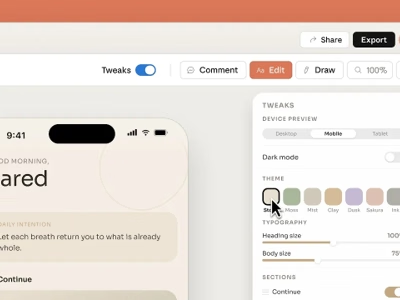
On April 17, 2026 — just one day after the Claude Opus 4.7 release — Anthropic unveiled Claude Design, a conversational tool for creating interfaces, prototypes, pitch decks, and marketing assets. The product launches under the banner of a brand-new division, Anthropic Labs, dedicated to experimental products that reach beyond the classic assistant interface. It’s the clearest signal yet that Anthropic is targeting not only the model layer but the tooling layer — going head-to-head with players like Figma, Canva, and v0.
What Claude Design Actually Is
Claude Design lets you design by talking to the model. Instead of manually arranging elements on a canvas or writing code, you describe what you need and the model produces ready-to-iterate designs. In the initial release, Claude Design covers:
- Interactive prototypes for user testing
- Product wireframes and UI mockups
- Design explorations and variants
- Pitch decks and presentations
- Marketing assets (landing pages, social media collateral)
- Code-powered prototypes — with voice, video, shaders, and 3D graphics
The engine behind all of this is Claude Opus 4.7, Anthropic’s newest and most advanced vision model, with substantially upgraded image handling (up to 3.75 megapixels) and significantly improved instruction following.
Anthropic Labs: A New Experimental Division
Claude Design is the flagship product of the freshly announced Anthropic Labs division. The company positions Labs as the team responsible for products that go beyond the standard chat experience — products that require dedicated interfaces, specialized tooling, and vertical integrations. It’s a typical move for a maturing AI vendor: having built a strong position in the model layer (Opus, Sonnet, Haiku) and the developer layer (Claude Code), the logical next step is vertical products for specific audiences.
The current status of Claude Design is research preview — the tool is rolling out gradually and some features may change over the coming weeks. It’s the same distribution pattern Anthropic has used for previous capability rollouts.
Features That Set Claude Design Apart
This isn’t a simple “chat-generates-a-UI” toy. In practice, it’s a full design environment with several elements that differentiate it clearly from the competition.
Brand System and Design Consistency
Claude Design automatically applies your team’s design system — colors, typography, UI components — to every project it generates. You don’t have to remind the model every time what your buttons should look like or how your heading hierarchy works. For teams that maintain a living design system, this is one of the most practically important elements.
Multiple Input Methods
A project can kick off in several ways:
- Text prompt — the obvious starting point
- File upload — DOCX, PPTX, XLSX (for example, a marketing brief in Word becomes the skeleton of a deck)
- Codebase integration — the tool can analyze an existing application’s code and generate a UI consistent with it
- Web capture — a screenshot of an existing page as a starting point for a redesign
Refinement Tools
Once a first version is generated, you can refine it without resorting to a full new prompt. Available controls:
- Inline comments on specific elements
- Direct text editing
- Sliders to adjust spacing, color, and layout
- Iterative prompts targeting only a selected fragment
This is a critical difference from tools that require re-generating the entire screen on every change.
Collaboration and Export
Claude Design operates in an organization-scoped model — projects can be shared across your company with view-only or edit access. Exports include:
- Internal URLs
- Folders and collections
- Canva (direct integration)
- PDF, PPTX
- Standalone HTML
- A handoff bundle ready for your development team via Claude Code
Handoff to Claude Code
This is the feature that most tightly couples the design layer with the implementation layer. A project can be packaged into a bundle passed directly to Claude Code — Anthropic’s CLI tool for code generation. Developers receive not just a visual spec, but full semantic context: components, naming, design system tokens. The net effect is that the design → code process can be closed in a single channel.
Examples from Early Access Partners
Anthropic highlighted several partner case studies that illustrate real time savings.
Brilliant — the learning platform — reports that “complex pages that required 20+ prompts elsewhere now take just 2 in Claude Design.” That’s a scale that changes the economics of marketing content production.
Datadog — the monitoring company — says directly that prototyping “now happens in a single conversation” instead of taking weeks of iterative review cycles. For product teams, that means a dramatically faster cycle for validating design hypotheses with users.
Canva Integration
One of the most interesting announcements is the Canva partnership. Projects generated in Claude Design can be opened directly in the Canva editor and developed further there. This matters because it shows that Anthropic isn’t trying to replace every design tool — it’s positioning Claude Design as a first-draft generator that then flows into specialized editors.
For marketing teams, this opens a new workflow: brief → conversation with Claude → export to Canva → final polish by a designer.
Pencil.dev: The MCP-Era Predecessor
Even before Claude Design launched, teams that wanted to design in dialogue with Claude already had pencil.dev — a canvas-based vector editor that looks and feels similar to Figma, but ships with native Claude integration via the Model Context Protocol (MCP).
Pencil.dev operates in an inverted model compared to Claude Design. The designer opens a traditional vector editor with its own .pen file format, and Claude steps in as a design assistant that, through the MCP server, can:
- Read the current editor state and user selection (
get_editor_state) - Fetch nodes from
.penfiles by pattern or ID (batch_get) - Execute canvas operations in batches (
batch_design— insert, copy, update, replace, move, delete, image) - Manage variables and design system tokens (
get_variables,set_variables) - Take screenshots and layout snapshots (
get_screenshot,snapshot_layout) - Mass-replace properties across the document (
replace_all_matching_properties)
The difference in philosophy matters:
| Aspect | Claude Design | pencil.dev + MCP |
|---|---|---|
| Interaction model | Conversation as primary interface | Canvas-first, Claude as assistant |
| Integration layer | First-party Anthropic product | External tool with MCP server |
| File format | Internal (exports to HTML/PPTX/PDF) | .pen (encrypted, editor-only) |
| Availability | Claude Pro/Max/Team/Enterprise plan | Separate pencil.dev subscription |
| Vendor lock | Claude-only (Opus 4.7) | Any MCP client (Claude or other LLMs) |
| UX maturity | Research preview | Stable editor with classical ergonomics |
For teams that need a full vector editor with the keybindings and tooling familiar from Figma, pencil.dev remains an attractive option — especially since MCP is an open protocol, so the tool doesn’t lock into a single AI vendor. Claude Design takes the more radical path: conversation is the interface, and canvas editing is a complementary tool rather than the starting point.
Availability and Pricing
Claude Design is available from launch day to subscribers of:
- Claude Pro
- Claude Max
- Claude Team
- Claude Enterprise
Usage is included in the existing subscription, with optional extra capacity beyond the baseline. Enterprise organizations must enable the tool through admin settings — a deliberate choice by Anthropic, allowing companies to control which teams get access while the product is in preview.
What This Means for Design and Marketing Teams in 2026
Claude Design is entering a crowded category that already includes Figma AI, Canva Magic Studio, Framer AI, v0 (Vercel), and Galileo AI. Its advantage rests on three elements:
- The Opus 4.7 model — currently the strongest vision and instruction-following on the general-purpose model market.
- Handoff to Claude Code — closing the design-to-code loop within a single Anthropic ecosystem.
- Brand integration by design — the design system isn’t an add-on, it’s a first-class citizen of the tool.
From the perspective of teams that maintain production websites with care for SEO and conversion, the most interesting part is the brief → prototype → production code path compressed into a single conversation. It won’t replace senior designers and developers, but it substantially changes the time-to-testable-MVP for new concepts.
Summary
Claude Design is a strategically important move for Anthropic. For the first time, the company steps outside a pure chat interface and offers a vertical product for design work. The combination of the freshly released Opus 4.7, design-system support, Canva integration, and direct handoff to Claude Code forms a coherent value chain — from brief all the way to production code.
For marketing agencies, product teams, and freelancers, this is a tool worth testing from day one of the research preview. The biggest unknown remains the quality of the code produced on handoff to Claude Code, and how Claude Design will hold up against highly complex enterprise design systems built by large organizations. The answers will come in the weeks of real-world usage ahead.
Frequently Asked Questions
What is Claude Design by Anthropic Labs?
Claude Design is a conversational design tool launched on April 17, 2026 by Anthropic Labs, a new experimental products division. It lets you create UI prototypes, product mockups, pitch decks, and marketing assets by talking to Claude Opus 4.7, without manually arranging elements on a canvas.
How much does Claude Design cost and how do I get access?
Claude Design is included in existing subscriptions for Claude Pro, Max, Team, and Enterprise plans. There is no separate fee for the tool, though optional additional usage capacity is available beyond the baseline. Enterprise organizations must enable the tool through admin settings.
Will Claude Design replace Figma, Canva, pencil.dev, or v0?
No — Claude Design positions itself as a first-draft generator that complements rather than replaces specialized editors. The Canva partnership lets you export projects for further editing there, the handoff to Claude Code routes designs into developer implementation, and teams that need a classical vector editor with MCP integration can continue using pencil.dev.
What export formats does Claude Design support?
Claude Design supports export to PDF, PPTX, standalone HTML, Canva, internal URLs, and organization folders and collections. Projects can also be packaged into a bundle passed directly to Claude Code with full semantic context — components, design system tokens, and naming.
Does Claude Design understand my company's design system?
Yes. Claude Design automatically applies your team's design system — colors, typography, and UI components — to every project it generates. This is one of the key differentiators against general-purpose tools that require you to repeat brand instructions on every project.
Which AI model powers Claude Design?
Claude Design is powered by Claude Opus 4.7 — Anthropic's newest and most advanced model, with image support up to 3.75 megapixels and significantly improved instruction following across long design sessions.
Sources
-
Claude Design by Anthropic Labs — Anthropic https://www.anthropic.com/news/claude-design-anthropic-labs
-
Introducing Claude Design by Anthropic Labs — YouTube https://www.youtube.com/watch?v=t_LBECIQQqs
-
Introducing Claude Opus 4.7 — Anthropic https://www.anthropic.com/news/claude-opus-4-7
-
Claude API Documentation — Anthropic https://docs.anthropic.com/claude/docs
-
Canva — About Page https://www.canva.com/about/
-
Pencil.dev — Design on canvas. Land in code https://pencil.dev
-
Model Context Protocol — Official Documentation https://modelcontextprotocol.io