%20--%3e%3csvg%20version='1.1'%20id='Layer_1'%20xmlns='http://www.w3.org/2000/svg'%20xmlns:xlink='http://www.w3.org/1999/xlink'%20x='0px'%20y='0px'%20viewBox='0%200%20120.17%2045.43'%20style='enable-background:new%200%200%20120.17%2045.43;'%20xml:space='preserve'%3e%3cg%3e%3cpath%20d='M32.33,0v16.13c0,2.21-0.42,4.3-1.26,6.26c-0.84,1.97-2,3.7-3.49,5.18c-1.49,1.49-3.2,2.65-5.15,3.49%20c-1.94,0.84-4.04,1.26-6.3,1.26c-2.21,0-4.3-0.42-6.26-1.26c-1.97-0.84-3.68-2-5.15-3.49c-1.46-1.49-2.62-3.21-3.46-5.18%20C0.42,20.42,0,18.34,0,16.13V0h6.41v16.13c0,1.34,0.25,2.62,0.76,3.82c0.5,1.2,1.2,2.24,2.09,3.13c0.89,0.89,1.92,1.58,3.1,2.09%20c1.18,0.5,2.44,0.76,3.78,0.76c1.34,0,2.62-0.25,3.82-0.76c1.2-0.5,2.24-1.2,3.13-2.09c0.89-0.89,1.58-1.93,2.09-3.13%20c0.5-1.2,0.76-2.47,0.76-3.82V0H32.33z'%20fill='%232563eb'%20/%3e%3cpath%20d='M50.4,0.14c2.26,0,4.36,0.42,6.3,1.26c1.94,0.84,3.66,1.99,5.15,3.46c1.49,1.46,2.65,3.17,3.49,5.11%20c0.84,1.94,1.26,4.04,1.26,6.3c0,2.21-0.42,4.3-1.26,6.26c-0.84,1.97-2,3.7-3.49,5.18c-1.49,1.49-3.2,2.65-5.15,3.49%20c-1.94,0.84-4.04,1.26-6.3,1.26h-9.72v12.96h-6.41V16.27c0-2.26,0.42-4.36,1.26-6.3c0.84-1.94,1.99-3.65,3.46-5.11%20c1.46-1.46,3.18-2.62,5.15-3.46C46.1,0.56,48.19,0.14,50.4,0.14z%20M54.22,25.31c1.2-0.5,2.24-1.2,3.13-2.09%20c0.89-0.89,1.58-1.93,2.09-3.13c0.5-1.2,0.76-2.47,0.76-3.82c0-1.34-0.25-2.6-0.76-3.78c-0.5-1.18-1.2-2.21-2.09-3.1%20c-0.89-0.89-1.93-1.58-3.13-2.09c-1.2-0.5-2.47-0.76-3.82-0.76c-1.34,0-2.6,0.25-3.78,0.76c-1.18,0.5-2.21,1.2-3.1,2.09%20c-0.89,0.89-1.58,1.92-2.09,3.1c-0.5,1.18-0.76,2.44-0.76,3.78v9.79h9.72C51.74,26.06,53.02,25.81,54.22,25.31z'%20fill='%232563eb'/%3e%3cpath%20d='M94.03,20.95l4.54,4.54l-2.23,2.23c-1.54,1.54-3.29,2.71-5.26,3.53c-1.97,0.82-4.03,1.22-6.19,1.22%20c-2.16,0-4.22-0.41-6.19-1.22c-1.97-0.82-3.72-1.99-5.26-3.53c-1.58-1.58-2.76-3.37-3.53-5.36c-0.77-1.99-1.15-4.02-1.15-6.08%20c0-2.06,0.38-4.08,1.15-6.05c0.77-1.97,1.94-3.74,3.53-5.33s3.37-2.77,5.36-3.56c1.99-0.79,4.02-1.19,6.08-1.19%20c2.06,0,4.09,0.4,6.08,1.19c1.99,0.79,3.78,1.98,5.36,3.56l2.23,2.23L80.64,25.06c1.82,0.91,3.75,1.21,5.8,0.9%20c2.04-0.31,3.83-1.24,5.36-2.77L94.03,20.95z%20M77.98,9.36c-1.92,1.92-2.88,4.22-2.88,6.91c0,1.49,0.33,2.9,1.01,4.25%20c0.58-0.58,1.45-1.45,2.63-2.63c1.18-1.18,2.42-2.42,3.74-3.74c1.32-1.32,2.59-2.58,3.82-3.78c1.22-1.2,2.17-2.14,2.84-2.81%20c-1.83-0.91-3.76-1.22-5.8-0.94C81.3,6.91,79.51,7.82,77.98,9.36z'%20fill='%232563eb'%20/%3e%3cpath%20d='M120.17,0v6.41h-3.24c-1.35,0-2.61,0.25-3.78,0.76c-1.18,0.5-2.21,1.2-3.1,2.09c-0.89,0.89-1.58,1.92-2.09,3.1%20c-0.5,1.18-0.76,2.44-0.76,3.78v16.2h-6.48v-16.2c0-2.26,0.42-4.36,1.26-6.3c0.84-1.94,2-3.65,3.49-5.11%20c1.49-1.46,3.21-2.62,5.18-3.46c1.97-0.84,4.06-1.26,6.27-1.26H120.17z'%20fill='%232563eb'/%3e%3c/g%3e%3c/svg%3e)
In 2026, a sitemap.xml file is no longer just a list of links for Googlebot. It has become a knowledge manifest that feeds RAG (Retrieval-Augmented Generation) systems and AI models. Proper sitemap analysis enables not only faster indexing, but above all quality control over the data that ends up in search engines’ vector databases.
Sitemap.xml analysis helps detect:
- Broken URLs — pages returning 404 or redirects
- Missing meta tags — pages without title or description
- Duplicate content — identical titles on different URLs
- Titles too long/short — SERP snippet issues
- Thin content — pages with insufficient content
- Outdated pages — content to remove or update
Traditional Analysis Methods vs Uper SEO Auditor
Screaming Frog
Popular desktop crawler, but:
- Requires installation (Windows/Mac)
- Free version limited to 500 URLs
- Crawls the entire site, not just the sitemap
- No native meta tag analysis from the sitemap level
Google Search Console
Shows indexing status, but:
- No full data export
- Limited meta tag information
- Delayed data (up to several days)
Manual Analysis
You can open sitemap.xml and check URLs one by one. With 50 pages, it takes an hour. With 500 — a whole day.
Sitemap Analyzer in Uper SEO Auditor
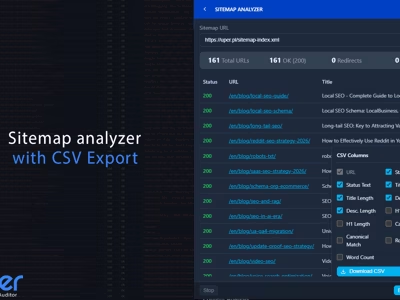
The UPER SEO Auditor extension includes a built-in sitemap analyzer that works directly in the browser:
- Fetches all URLs from sitemap.xml
- Checks the title and meta description of each page
- Shows character counts and HTTP status codes
- Detects thin content, duplicates, and redirects
- Exports results to CSV
Where Does the Crawler Start?
A sitemap is a roadmap. For a crawler (or AI scraper) to find it, it must be declared in the robots.txt file. The Uper SEO Auditor extension automatically parses the robots.txt contents looking for the Sitemap: directive. This is the first test — if the sitemap isn’t declared there, you’re wasting your crawl budget as the crawler is forced to wander through your internal link structure.
You can also enter a custom URL, e.g., /sitemap_index.xml or /news-sitemap.xml.
 Sitemap Analyzer in the Chrome side panel with sitemap analysis and a summary of detected issues.
Analysis Process and Rate Limiting
After clicking “Analyze,” the extension:
- Fetches sitemap.xml — parses XML and extracts all URLs
- Handles sitemap index — if the sitemap contains links to other sitemaps, fetches them recursively
- Checks each URL — batch processing with rate limiting (5 concurrent requests)
- Extracts meta data — title, description, HTTP status, word count
Server Safety
To avoid overloading the server, the analyzer:
- Sends max 5 requests simultaneously
- Waits 200ms between batches
- Allows stopping the analysis at any time
These safeguards mean you can safely analyze even large websites without risking a server block.
Analysis Results
After completion, you’ll see a table with all URLs:
| Column | Description |
|---|---|
| URL | Full page address |
| Title | Page title (from <title>) |
| Title Length | Title character count |
| Description | Meta description |
| Desc Length | Description character count |
Click a column header to sort results — e.g., by Title Length to quickly find titles that are too short or too long.
The End of Priority and Changefreq (Case Study: WhitePress)
Many SEO specialists still waste time configuring <priority> and <changefreq> parameters. Analyzing the sitemap of WhitePress (4,473 URLs) with the Uper extension clearly shows that these fields are completely ignored by Google today. Crawlers decide on visit frequency based on site authority and content freshness. Focusing on these tags is repeating myths from a decade ago.
 WhitePress sitemap audit — all 4,473 URLs bloating the file with deprecated priority and changefreq fields that Google ignores.
Issues Summary: A Technical X-Ray of Your Content (Case Study: Linkhouse)
The Issues Summary module enables rapid detection of semantic errors. Auditing the linkhouse.pl domain (318 URLs), we can see issues that directly affect how AI “understands” your site.
Thin Content (< 300 words)
11 pages (about 3%) have too little content. For AI systems, such pages are useless — they add no value to the knowledge base and may drag down the overall quality score of your site.
Meta Tag Errors
The audit flagged 140 titles as too long (>60 characters) and 10 pages missing an H1 heading. Without a clear hierarchy, AI scrapers struggle to properly chunk text into fragments.
Redirects (3xx)
24 URLs in the sitemap are redirects. A sitemap should only contain final URLs (200 OK). Submitting redirects wastes Google’s crawling resources.
 Issues Summary for linkhouse.pl — 140 overly long titles, 24 redirects, and 11 thin content pages.
Sitemap Analyzer — Interactive Preview
The “Preview in New Tab” button opens a full audit in a SERP-style layout. Here you can evaluate how your pages appear “through the eyes of a crawler.” Filtering lets you quickly isolate addresses with overly long titles, clearly visible in the detailed WhitePress audit.
 Preview mode for Linkhouse — full URL list with titles, descriptions, and link statistics.
 WhitePress audit — duplicate page titles that need unique descriptions.
Extract URLs: From Analysis to Action
One of Uper’s most powerful features is Extract URLs. The tool enables smart data filtering before export. You can, for example, extract only broken links (Broken Links 4xx/5xx) from the WhitePress sitemap and download them as CSV for immediate fixing.
 Filtering URLs by HTTP status code — quick extraction of pages with 404 and 301 errors.
 WhitePress audit — 1,562 duplicate URLs and 1,905 duplicate titles requiring immediate attention.
Practical Applications of Audit Data
After exporting data to CSV, you can open it in Google Sheets, Microsoft Excel, LibreOffice Calc, or Numbers for in-depth analysis.
URL,Title,Title Length,Description,Description Length
https://example.com/,Example Site - Home,22,Welcome to Example Site,24
https://example.com/about/,About Us | Example,19,Learn about our company,24
https://example.com/contact/,Contact - Example Site,22,,0
1. SEO Title Audit
Optimal title length is 50-60 characters. In your spreadsheet, use:
=IF(C2<30,"Too short",IF(C2>60,"Too long","OK"))2. Finding Pages Without Description
Filter the “Desc Length” column by value 0. These pages need meta descriptions.
3. Detecting Duplicate Titles
In the spreadsheet, use conditional formatting to highlight duplicate titles:
- Select the Title column
- Format → Conditional Formatting
- Rule: “Custom formula” →
=COUNTIF(B:B,B1)>1
4. URL Structure Analysis
Exported URLs can be split into segments and analyzed:
- Which categories have the most pages?
- How deep is the URL structure?
- Are there unexpected paths?
5. Comparison with Google Index
Compare sitemap URLs with Google Search Console data:
- Export URLs from Sitemap Analyzer
- Export indexed pages from GSC
- Find differences (URLs in sitemap but not in index)
Comparison View — Monitoring Changes Over Time
Re-analyzing the same sitemap activates the Comparison View. This is where you can see change dynamics — what was modified between analyses, with detailed comparison of old and new meta tag values.
For RAG systems, this is a critical content pruning (cleanup) process. If key sections disappeared from the sitemap, the AI system must be notified to remove outdated embeddings and stop generating answers based on content that no longer exists.
 Comparison View — comparing changes in descriptions and modification dates between analyses.
Sitemap and Google Search Console
In the “Page indexing” report in GSC, use the “All submitted pages” filter. If you see a large number of URLs that are “discovered but not indexed” — like in the example below, where out of 28.7K known pages only 5.16K are indexed — that’s a red flag.
 Google Search Console — over 80% of pages are not indexed. Most common causes: duplicates, redirects, and thin content.
The most common issues visible in the GSC report are “Duplicate without user-selected canonical,” “Page with redirect,” and “Crawled — currently not indexed.” Each of these problems can be identified and fixed in Uper SEO Auditor — you’ll find thin content and redirects in Issues Summary, and catch duplicate titles and descriptions in the Preview view.
Advanced Scaling and Multimedia
For large sites, don’t forget about additional sitemap types and scaling techniques.
Sitemap Index
Splitting into multiple files (up to 50,000 URLs each) for better prioritization. This allows crawlers to process large sites more efficiently, and gives you control over the indexing order of individual sections.
Video/Image Sitemap
Providing transcripts and multimedia descriptions for AI visual search. With the evolution of multimodal models like Gemini and GPT-4o, this data is becoming increasingly valuable.
Hreflang in XML
The cleanest way to map language versions without bloating the <head> section. Especially important for large multilingual sites, where hreflang in HTML can significantly increase document size.
Handling Large Sitemaps
Sitemap Analyzer handles large websites:
- Sitemap index — automatically fetches all sub-sitemaps
- Safety limit — max 100,000 URLs
- Stop option — Stop button available at any time
- Partial results — you can export data even after interruption
Tips for Large Websites
- Test on a smaller sitemap — e.g.,
/blog-sitemap.xmlinstead of index - Analyze in parts — divide analysis by categories
- Export regularly — save results before continuing
Checklist: Technical Sitemap Audit
- Declaration: Is the sitemap in robots.txt?
- HTTP Codes: Have you eliminated all 3xx and 4xx (use the filter in Extract URLs)?
- Metadata: Have you fixed “Missing H1” and “Title too long” errors?
- Content: Have thin content pages been expanded or removed from the sitemap?
- Duplicates: Are titles and descriptions unique (use conditional formatting in your spreadsheet)?
- Hygiene: Are you regularly cleaning old data in Cached Data Management to see the current state?
 Cache data management — re-analysis reveals changes since the last audit.
Summary
Analyzing sitemaps with Uper SEO Auditor using real examples from platforms like Linkhouse and WhitePress proves that even the biggest players need to maintain XML file hygiene. The tool combines advanced diagnostics (Issues Summary, Comparison View) with practical export features that allow further data processing in spreadsheets. In 2026, a clean sitemap is the foundation of visibility in the world of AI algorithms.
Try UPER SEO Auditor and analyze your website’s sitemap.
Sources
-
Google Search Central: Sitemaps overview https://developers.google.com/search/docs/crawling-indexing/sitemaps/overview
-
Google Search Central: Build and submit a sitemap https://developers.google.com/search/docs/crawling-indexing/sitemaps/build-sitemap
-
Sitemaps.org: XML format https://www.sitemaps.org/protocol.html
-
Google Search Console: Sitemap report https://support.google.com/webmasters/answer/7451001