%20--%3e%3csvg%20version='1.1'%20id='Layer_1'%20xmlns='http://www.w3.org/2000/svg'%20xmlns:xlink='http://www.w3.org/1999/xlink'%20x='0px'%20y='0px'%20viewBox='0%200%20120.17%2045.43'%20style='enable-background:new%200%200%20120.17%2045.43;'%20xml:space='preserve'%3e%3cg%3e%3cpath%20d='M32.33,0v16.13c0,2.21-0.42,4.3-1.26,6.26c-0.84,1.97-2,3.7-3.49,5.18c-1.49,1.49-3.2,2.65-5.15,3.49%20c-1.94,0.84-4.04,1.26-6.3,1.26c-2.21,0-4.3-0.42-6.26-1.26c-1.97-0.84-3.68-2-5.15-3.49c-1.46-1.49-2.62-3.21-3.46-5.18%20C0.42,20.42,0,18.34,0,16.13V0h6.41v16.13c0,1.34,0.25,2.62,0.76,3.82c0.5,1.2,1.2,2.24,2.09,3.13c0.89,0.89,1.92,1.58,3.1,2.09%20c1.18,0.5,2.44,0.76,3.78,0.76c1.34,0,2.62-0.25,3.82-0.76c1.2-0.5,2.24-1.2,3.13-2.09c0.89-0.89,1.58-1.93,2.09-3.13%20c0.5-1.2,0.76-2.47,0.76-3.82V0H32.33z'%20fill='%232563eb'%20/%3e%3cpath%20d='M50.4,0.14c2.26,0,4.36,0.42,6.3,1.26c1.94,0.84,3.66,1.99,5.15,3.46c1.49,1.46,2.65,3.17,3.49,5.11%20c0.84,1.94,1.26,4.04,1.26,6.3c0,2.21-0.42,4.3-1.26,6.26c-0.84,1.97-2,3.7-3.49,5.18c-1.49,1.49-3.2,2.65-5.15,3.49%20c-1.94,0.84-4.04,1.26-6.3,1.26h-9.72v12.96h-6.41V16.27c0-2.26,0.42-4.36,1.26-6.3c0.84-1.94,1.99-3.65,3.46-5.11%20c1.46-1.46,3.18-2.62,5.15-3.46C46.1,0.56,48.19,0.14,50.4,0.14z%20M54.22,25.31c1.2-0.5,2.24-1.2,3.13-2.09%20c0.89-0.89,1.58-1.93,2.09-3.13c0.5-1.2,0.76-2.47,0.76-3.82c0-1.34-0.25-2.6-0.76-3.78c-0.5-1.18-1.2-2.21-2.09-3.1%20c-0.89-0.89-1.93-1.58-3.13-2.09c-1.2-0.5-2.47-0.76-3.82-0.76c-1.34,0-2.6,0.25-3.78,0.76c-1.18,0.5-2.21,1.2-3.1,2.09%20c-0.89,0.89-1.58,1.92-2.09,3.1c-0.5,1.18-0.76,2.44-0.76,3.78v9.79h9.72C51.74,26.06,53.02,25.81,54.22,25.31z'%20fill='%232563eb'/%3e%3cpath%20d='M94.03,20.95l4.54,4.54l-2.23,2.23c-1.54,1.54-3.29,2.71-5.26,3.53c-1.97,0.82-4.03,1.22-6.19,1.22%20c-2.16,0-4.22-0.41-6.19-1.22c-1.97-0.82-3.72-1.99-5.26-3.53c-1.58-1.58-2.76-3.37-3.53-5.36c-0.77-1.99-1.15-4.02-1.15-6.08%20c0-2.06,0.38-4.08,1.15-6.05c0.77-1.97,1.94-3.74,3.53-5.33s3.37-2.77,5.36-3.56c1.99-0.79,4.02-1.19,6.08-1.19%20c2.06,0,4.09,0.4,6.08,1.19c1.99,0.79,3.78,1.98,5.36,3.56l2.23,2.23L80.64,25.06c1.82,0.91,3.75,1.21,5.8,0.9%20c2.04-0.31,3.83-1.24,5.36-2.77L94.03,20.95z%20M77.98,9.36c-1.92,1.92-2.88,4.22-2.88,6.91c0,1.49,0.33,2.9,1.01,4.25%20c0.58-0.58,1.45-1.45,2.63-2.63c1.18-1.18,2.42-2.42,3.74-3.74c1.32-1.32,2.59-2.58,3.82-3.78c1.22-1.2,2.17-2.14,2.84-2.81%20c-1.83-0.91-3.76-1.22-5.8-0.94C81.3,6.91,79.51,7.82,77.98,9.36z'%20fill='%232563eb'%20/%3e%3cpath%20d='M120.17,0v6.41h-3.24c-1.35,0-2.61,0.25-3.78,0.76c-1.18,0.5-2.21,1.2-3.1,2.09c-0.89,0.89-1.58,1.92-2.09,3.1%20c-0.5,1.18-0.76,2.44-0.76,3.78v16.2h-6.48v-16.2c0-2.26,0.42-4.36,1.26-6.3c0.84-1.94,2-3.65,3.49-5.11%20c1.49-1.46,3.21-2.62,5.18-3.46c1.97-0.84,4.06-1.26,6.27-1.26H120.17z'%20fill='%232563eb'/%3e%3c/g%3e%3c/svg%3e)

Uper SEO Auditor: Professional Insight Into What Happens Under the Hood of Your Website
Most SEO plugins available in the Chrome Web Store are simple meta-tag readers. While useful for basic optimization, they completely fail with modern SPA applications (Next.js, React), ignore JavaScript errors in the console, and provide data that requires constant page refreshing and clicking the extension icon to open a popup with information.
From my perspective as a web developer, I’ve often found myself on both sides of the fence: implementing complex SEO audits on large websites and optimizing frontends for Core Web Vitals. Uper SEO Auditor is the result of these experiences – a tool built by developers for developers and specialists who need concrete data, not vague generalities.
Why Traditional Tools Fail in 2026?
Traditional plugins work linearly: they load the page, extract tags, and finish. In the era of event-driven architecture, this approach is insufficient. A modern website is a dynamic process where content, structured data, and performance metrics change with every user interaction.
Of course, powerful tools for mass audits exist (Screaming Frog, Ahrefs, SEMrush), which excel at analyzing tens of thousands of pages. Uper SEO Auditor fills a different niche – it’s a tool for quick verification and live debugging while working on a site. Instead of running a full crawl, you can instantly check if a fix works, what the DataLayer looks like, or what errors the console throws.
Uper was designed to keep up with the dynamics of modern applications, offering insight into what’s not visible at first glance in the source code.
1. Your Command Center in the Side Panel
Uper utilizes Chrome’s native Side Panel, becoming an integral part of your workflow. You can freely navigate the site, test purchase paths or interactions, while watching data update in real-time. No more chaos with dozens of open tabs – everything important happens right next to the content you’re analyzing.
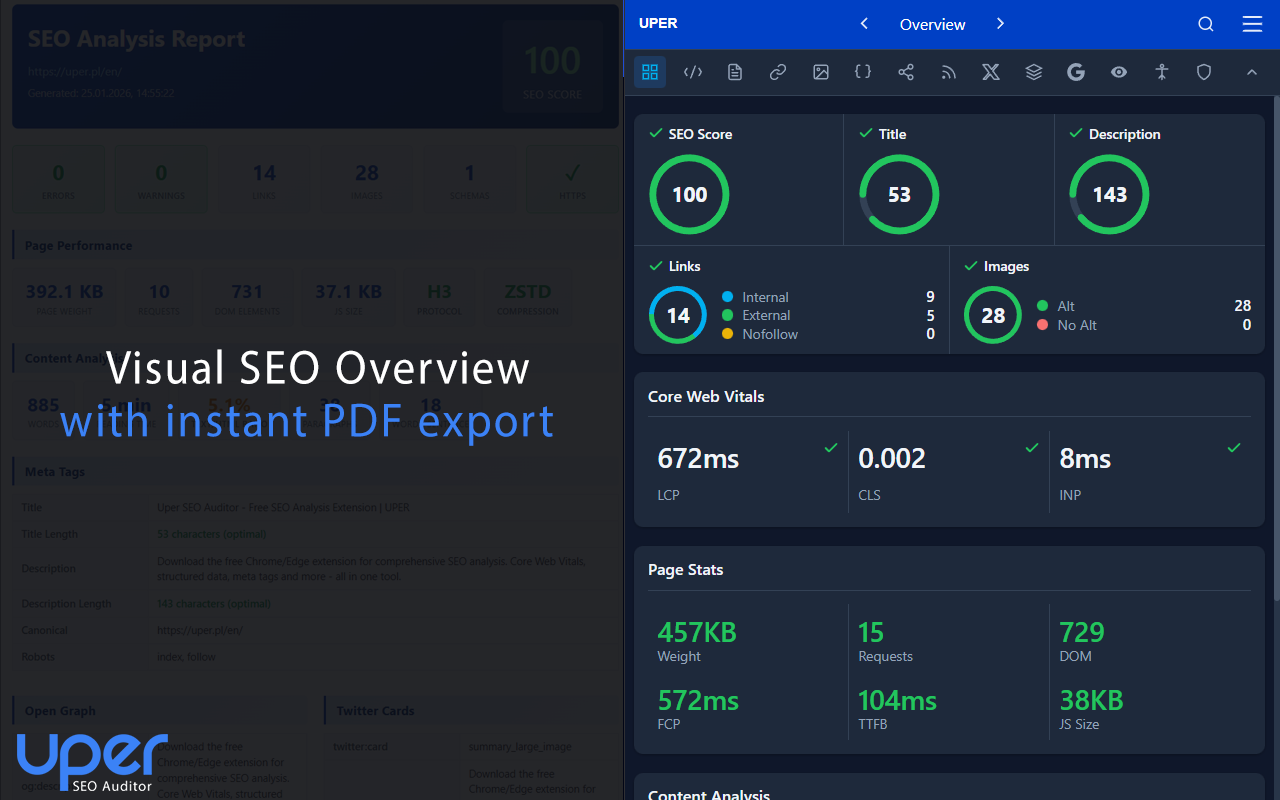 Visual overview of page health with instant PDF report export option.
2. Web Vitals and SPA: Audit Without Compromise
Working on large websites, I noticed that most tools measure performance only during “hard” page reloads. Uper monitors LCP, CLS, and INP metrics continuously. Thanks to native Soft Navigations support, we correctly collect metrics on dynamic pages. If navigation in your store causes a sudden CLS spike, you’ll know immediately.
3. Debugging Google Services and DataLayer: An Analyst’s Treasure
This feature puts Uper in a completely different league. It allows deep inspection of the analytics layer without launching heavy GTM debugging modes:
- Google Stack: Verification of Google Tag Manager events and Consent Mode status “on the fly.”
- DataLayer Inspector: Preview of events pushed to the data layer with every interaction.
- Blocking Detection: We inform you if analytics scripts are blocked by CSP policy or Ad-blockers.
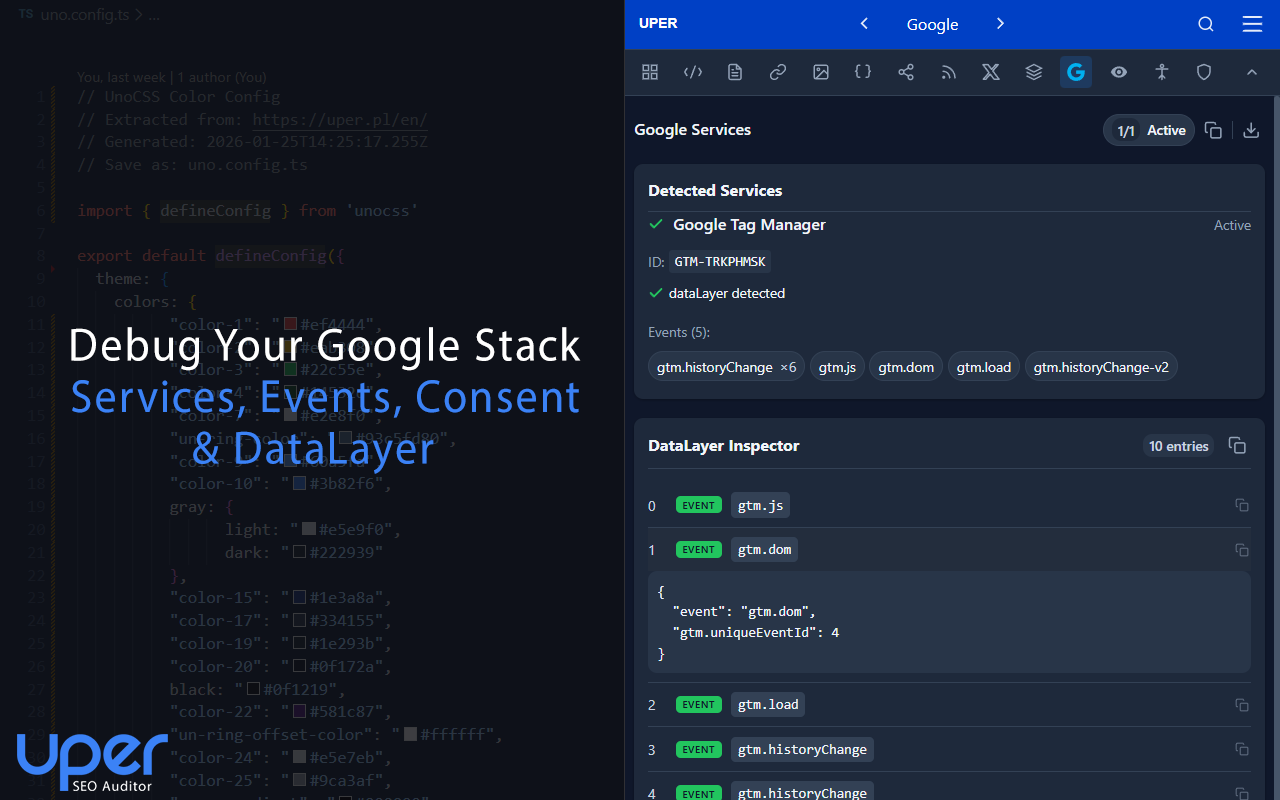 Complete Google services debugging and DataLayer event inspector.
4. Design System and Export for Developers
Good frontend and technical SEO are connected vessels. Uper automatically extracts key visual parameters, facilitating SEO-Developer collaboration:
- Color Palette: Color detection with export to Tailwind, UnoCSS, or CSS variables.
- Tech Stack: Precise identification of frameworks (e.g., Vue.js), UI systems, and CDN infrastructure.
- Typography: Detailed list of fonts, their weights, and loading sources.
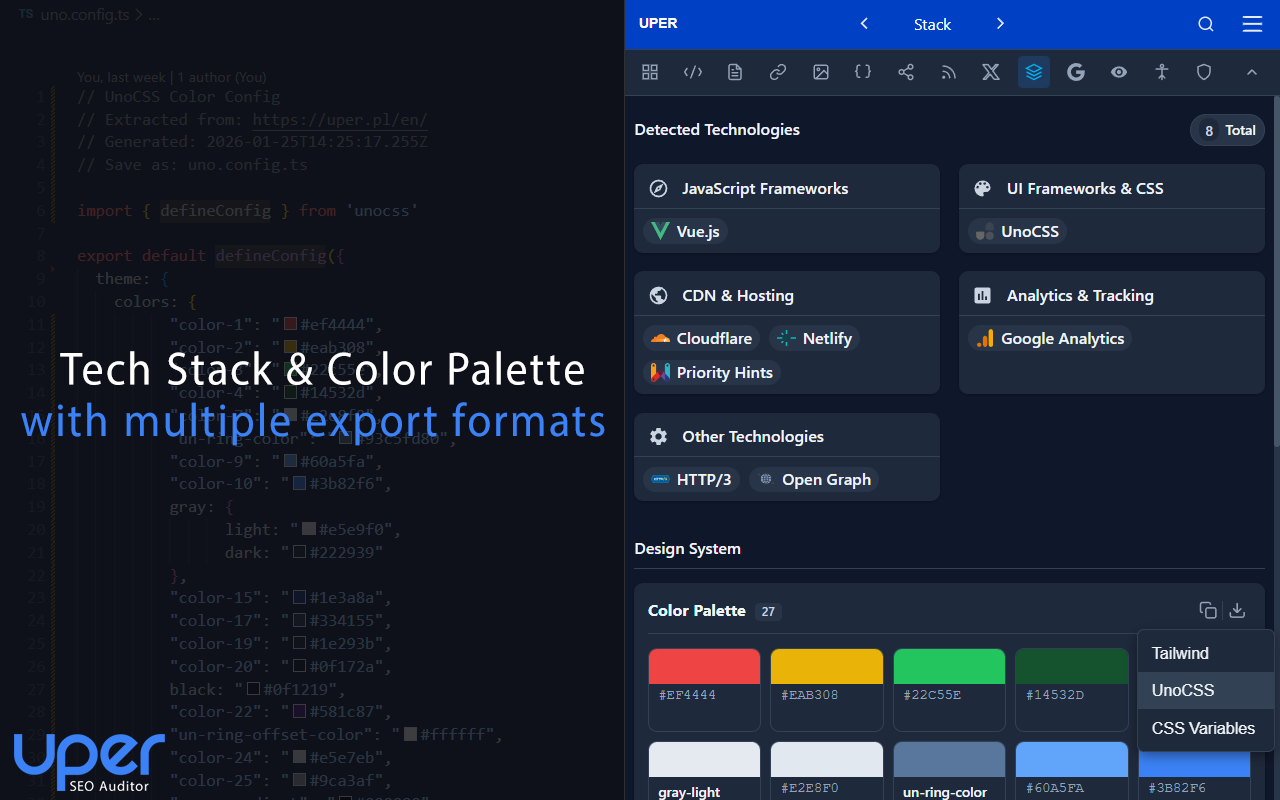 Automatic technology extraction and ready-to-use Design System.
5. Precise Content and Meta Tags Control
For those who care about on-page details, Uper offers tools beyond standard validation:
- SERP Preview: Realistic simulation of appearance in Google search results.
- Content Analysis: Insight into heading hierarchy and keyword density statistics (single, bigrams, trigrams).
- AI Support: Intelligent suggestions helpful for content optimization.
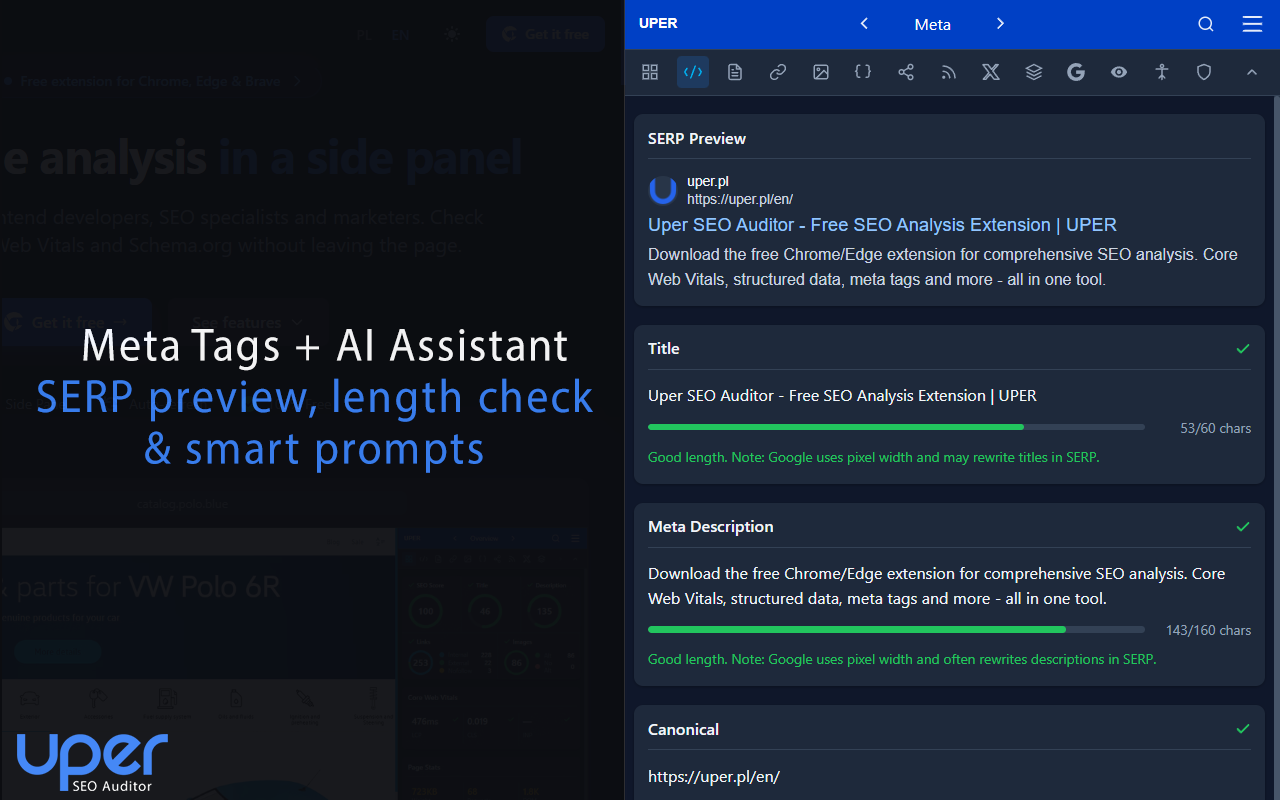 Meta-tags validation and SERP preview with AI assistant support.
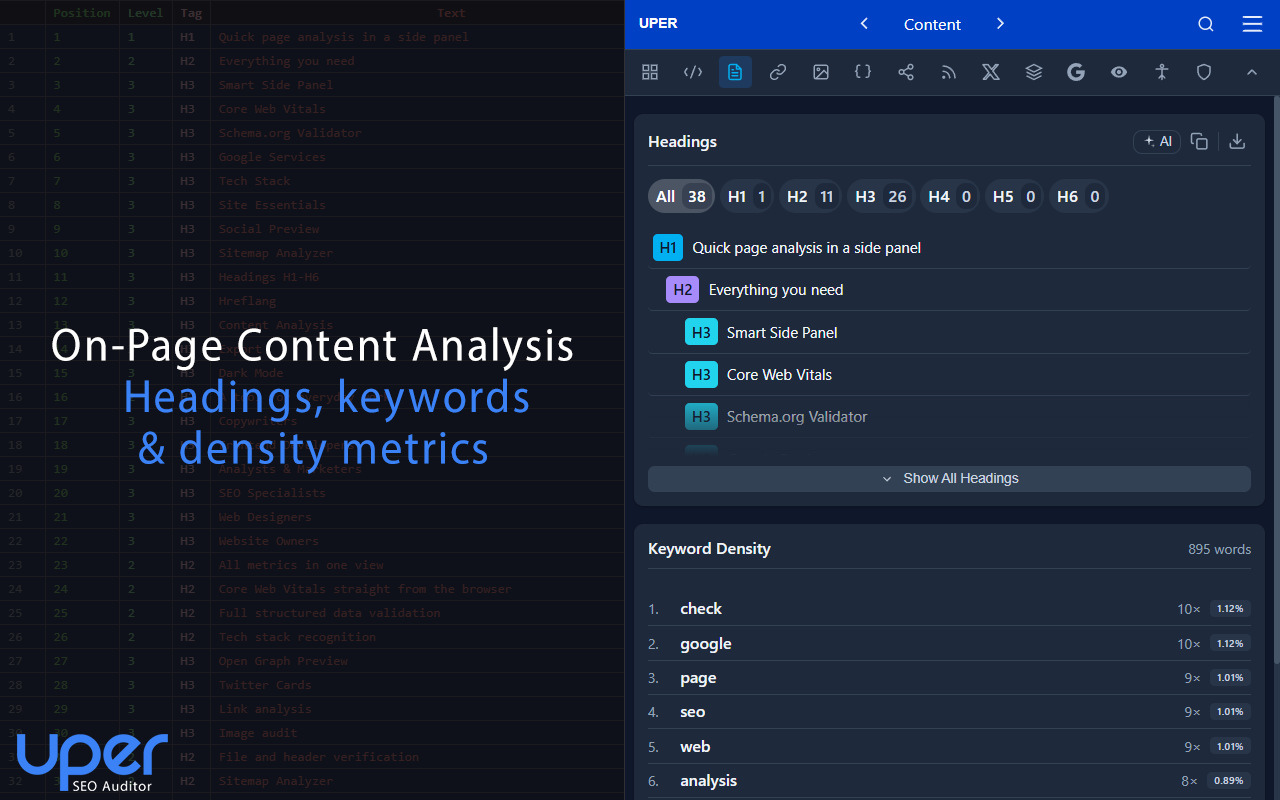 Detailed content structure analysis and keyword metrics.
6. Sitemap Crawler and Critical Error Diagnostics
The built-in Sitemap Analyzer allows auditing hundreds of URLs from the sitemap in seconds. Moreover, Uper monitors the console for JavaScript errors. This is critical for SEO – a code error can make a search bot see an “empty” page. As an engineer, I know how often such errors slip through standard audits.
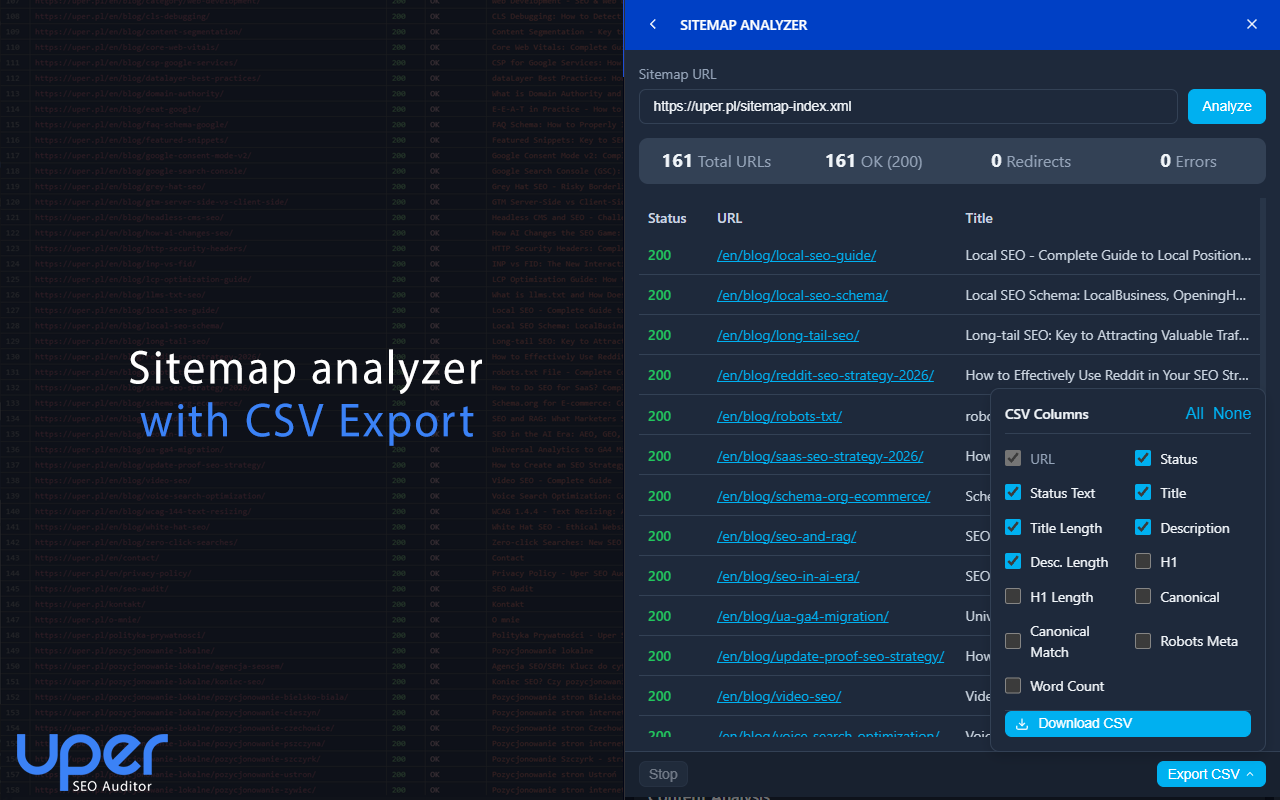 Mass audit of URLs from sitemap with CSV format export.
About the Author and Project
My name is Szymon Berski, and I work as a Senior Software Engineer. Frontend and SEO are not just my job, but above all, my hobby. Through years of working on various projects – from small sites to large services – I’ve implemented hundreds of fixes according to SEO audits.
I noticed there was a lack of a tool that spoke developers’ language while delivering hard SEO data. Uper SEO Auditor was created to fill this gap. It’s a tool built with passion for clean code and high Google rankings.
Test Your Website
Check how Uper SEO Auditor handles your website and what data it extracts “under the hood.” The tool is available directly in the Chrome Web Store.


