---
title: "CLS Debugging: How to Detect and Fix Cumulative Layout Shift"
description: "Complete guide to debugging CLS. Learn the causes of layout shifts, tools for detecting issues, and techniques for fixing Core Web Vitals problems."
date: 2025-12-20
updated: 2026-03-16
category: Optimization
tags: ["Core Web Vitals", "CLS", "Performance", "SEO", "Optimization", "Layout Shift"]
url: https://uper.pl/en/blog/cls-debugging/
---
# CLS Debugging: How to Detect and Fix Cumulative Layout Shift
**Cumulative Layout Shift (CLS)** is one of the three [Core Web Vitals](/en/blog/core-web-vitals/) metrics that measures the visual stability of a page. Unexpected element shifts frustrate users and can negatively impact Google rankings. This guide will help you identify and fix CLS issues.
## What is CLS?
**CLS** measures the sum of all unexpected layout shifts that occur during the entire page lifecycle. A shift is "unexpected" when an element changes position without user interaction (e.g., clicking).
### How is CLS Calculated?
CLS = sum of (impact fraction × distance fraction) for each shift
- **Impact fraction** - percentage of viewport occupied by the shifted element
- **Distance fraction** - shift distance as a percentage of the viewport
### CLS Thresholds
| Score | Rating |
|-------|--------|
| ≤ 0.1 | **Good** (green) |
| 0.1 - 0.25 | **Needs Improvement** (orange) |
| > 0.25 | **Poor** (red) |
## Most Common Causes of CLS
### 1. Images Without Dimensions
When the browser doesn't know an image's dimensions, it reserves 0px height, and a shift occurs after the image loads.
```html
```
### 2. Ads and Embeds
Ads often load with a delay and have dynamic height.
```html
```
### 3. Dynamically Injected Content
Cookie banners, push notifications, toolbars - anything that appears after the page loads.
```css
/* Instead of pushing content, use overlay */
.cookie-banner {
position: fixed;
bottom: 0;
/* DON'T use position: relative at the top of the page */
}
```
### 4. Web Fonts (FOUT/FOIT)
Swapping the fallback font for the target font can change text size.
```css
/* Match fallback to target font */
@font-face {
font-family: 'Inter';
src: url('/fonts/inter.woff2') format('woff2');
font-display: swap;
/* Use size-adjust for matching */
size-adjust: 100%;
ascent-override: 90%;
descent-override: 20%;
line-gap-override: 0%;
}
/* Or use font-display: optional */
@font-face {
font-family: 'Inter';
src: url('/fonts/inter.woff2') format('woff2');
font-display: optional; /* Don't show fallback if font doesn't load quickly */
}
```
### 5. Animations Causing Reflow
Animations on `width`, `height`, `top`, `left` cause reflow and can affect CLS.
```css
/* Bad - height animation */
.menu {
transition: height 0.3s;
}
/* Good - transform animation */
.menu {
transition: transform 0.3s;
transform-origin: top;
}
.menu.collapsed {
transform: scaleY(0);
}
```
## CLS Debugging Tools
### 1. Chrome DevTools - Performance
1. Open DevTools (F12)
2. Go to the **Performance** tab
3. Check **Web Vitals**
4. Press **Ctrl+Shift+E** (record with reload)
5. Look for red **Layout Shift** markers
### 2. Chrome DevTools - Rendering
1. Open DevTools
2. Press **Ctrl+Shift+P**
3. Type "Show Rendering"
4. Check **Layout Shift Regions**
5. Blue rectangles show shifts in real-time
### 3. Web Vitals Extension
Chrome extension showing CLS, LCP, and INP in real-time:
[Web Vitals Extension](https://chrome.google.com/webstore/detail/web-vitals/ahfhijdlegdabablpippeagghigmibma)
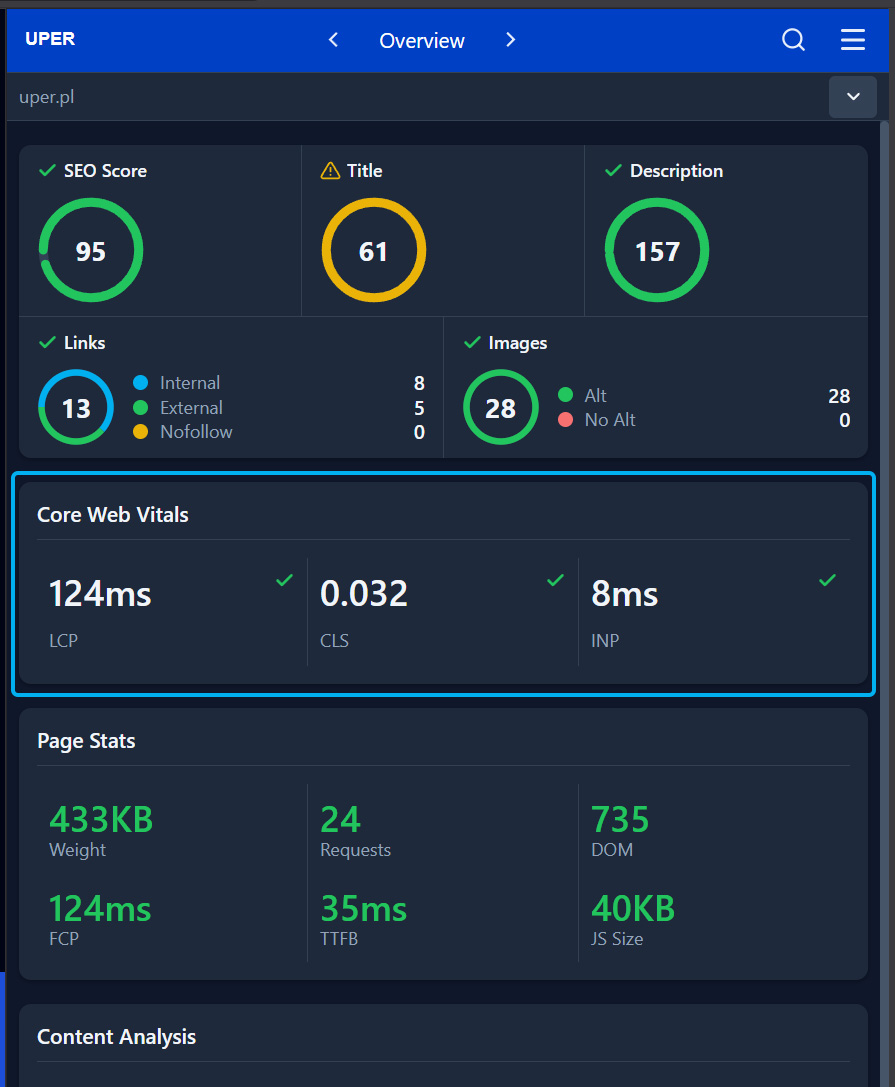
### 4. Uper SEO Auditor
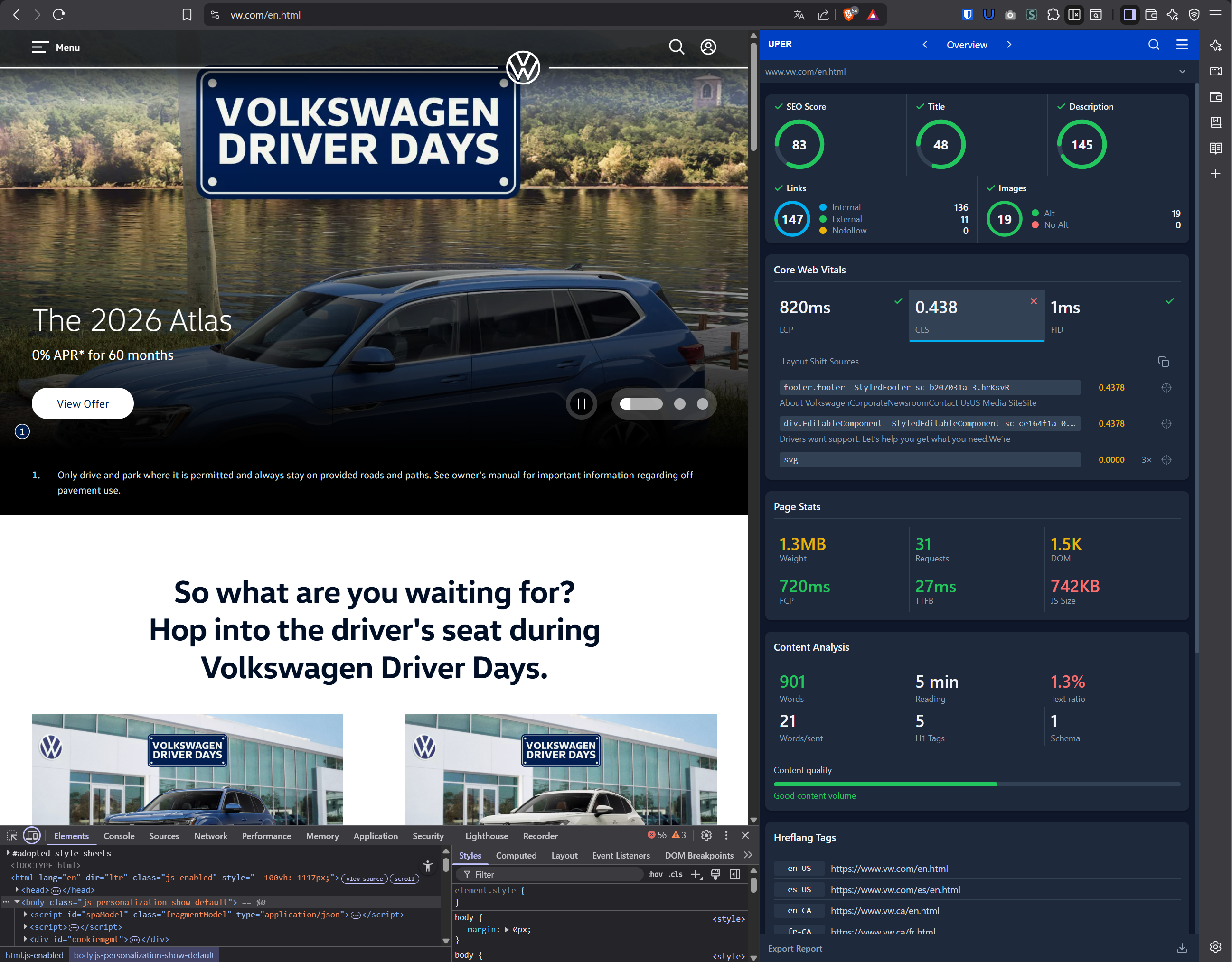
The [Uper SEO Auditor](https://chromewebstore.google.com/detail/uper-seo-auditor/khhpbeckpphaoiemjdijhbfpjnendage) extension lets you quickly check Core Web Vitals results directly on the analyzed page — including the CLS value:
Uper also pinpoints the specific elements causing layout shifts — for example, on vw.com it detected a footer and div with a CLS value of 0.44:
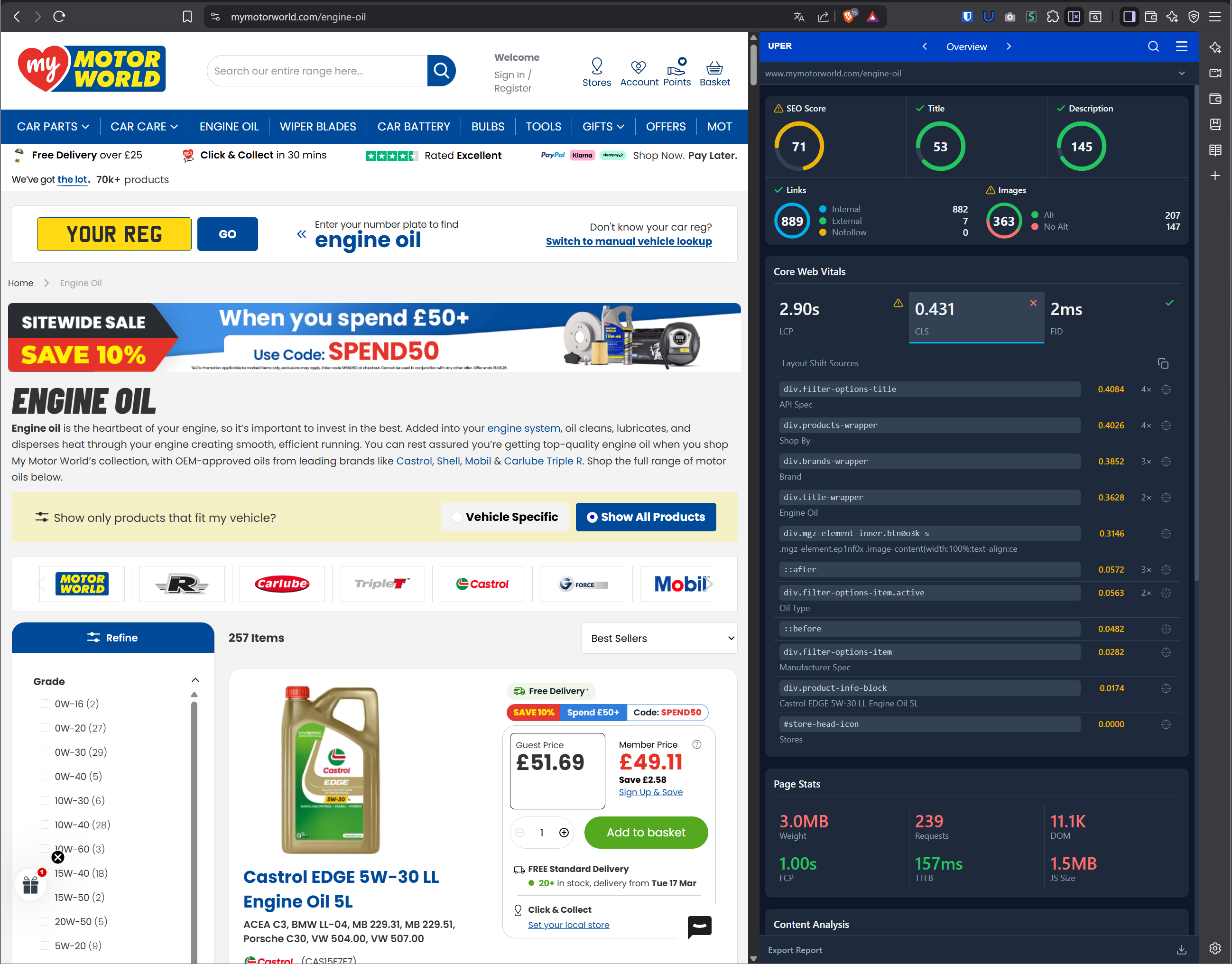
Another example — mymotoworld.com with CLS 0.431, where 11 elements are causing layout shifts, including filters, product wrappers, and title elements:
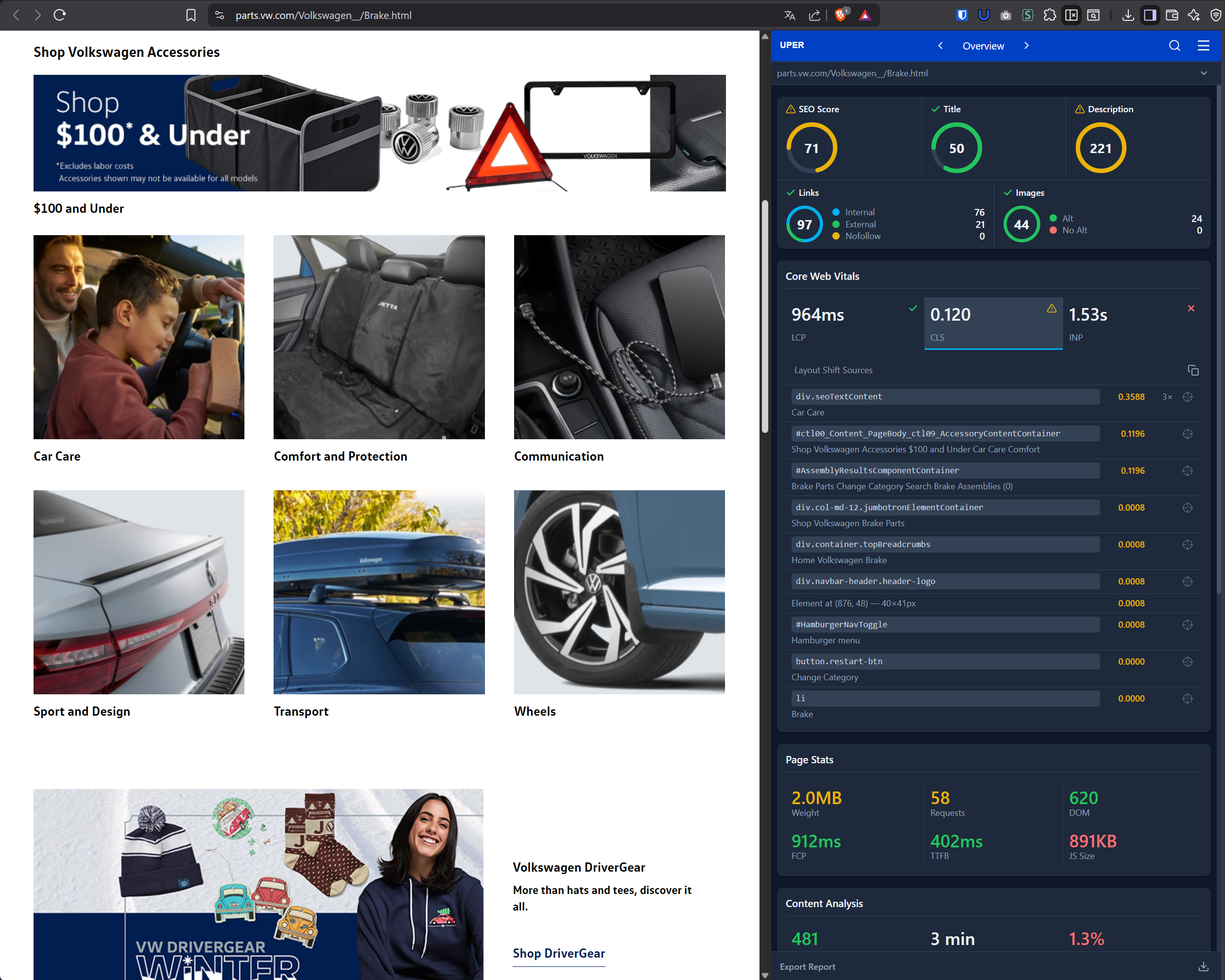
A similar issue on parts.vw.com — SEO content (`div.seoTextContent`) causes a shift of 0.36, and 10 elements in total contribute to layout instability:
### 5. Lighthouse
```bash
# CLI
npx lighthouse https://example.com --only-categories=performance
# Or in Chrome DevTools → Lighthouse
```
### 6. PageSpeed Insights
[https://pagespeed.web.dev/](https://pagespeed.web.dev/) - shows CLS from both lab and field data (CrUX).
### 7. Layout Instability API
Programmatic detection of shifts:
```javascript
// Listen for layout shifts
const observer = new PerformanceObserver((list) => {
for (const entry of list.getEntries()) {
if (!entry.hadRecentInput) {
console.log('Layout shift detected:', entry);
console.log('Value:', entry.value);
console.log('Sources:', entry.sources);
// Show which elements shifted
entry.sources?.forEach(source => {
console.log('Element:', source.node);
console.log('Previous rect:', source.previousRect);
console.log('Current rect:', source.currentRect);
});
}
}
});
observer.observe({ type: 'layout-shift', buffered: true });
```
### 8. web-vitals Library
```javascript
onCLS(console.log, { reportAllChanges: true });
// { name: 'CLS', value: 0.15, rating: 'needs-improvement', entries: [...] }
```
## CLS Fix Techniques
### 1. Reserving Space for Images
**Method 1: width and height attributes**
```html
```
The browser will calculate the aspect ratio and reserve space.
**Method 2: CSS aspect-ratio**
```css
.hero-image {
aspect-ratio: 16 / 9;
width: 100%;
height: auto;
}
```
**Method 3: Padding hack (legacy)**
```css
.image-container {
position: relative;
padding-bottom: 56.25%; /* 16:9 = 9/16 = 0.5625 */
}
.image-container img {
position: absolute;
top: 0;
left: 0;
width: 100%;
height: 100%;
object-fit: cover;
}
```
### 2. Reserving Space for Ads
```css
.ad-slot {
min-height: 250px; /* Standard ad height */
background: #f0f0f0; /* Placeholder */
}
/* For responsive ads */
.ad-slot-responsive {
min-height: 100px;
}
@media (min-width: 768px) {
.ad-slot-responsive {
min-height: 250px;
}
}
```
### 3. Skeleton Screens
Instead of empty space, show a skeleton:
```html
```
```javascript
// Intersection Observer for lazy loading
const observer = new IntersectionObserver((entries) => {
entries.forEach(entry => {
if (entry.isIntersecting) {
const img = entry.target;
img.src = img.dataset.src;
observer.unobserve(img);
}
});
});
document.querySelectorAll('img[data-src]').forEach(img => {
observer.observe(img);
});
```
### 7. Avoiding document.write()
```javascript
// Bad - document.write blocks parser
document.write('');
// Good - dynamic insertion
const script = document.createElement('script');
script.src = 'ad.js';
script.async = true;
document.body.appendChild(script);
```
## Debugging Specific Scenarios
### Scenario 1: CLS from Google Fonts
**Problem:** Text changes size after font loads.
**Diagnosis:**
1. Open DevTools → Network
2. Filter by "font"
3. Check font timing vs FCP
**Solution:**
```html
```
### Scenario 2: CLS from Lazy-loaded Images
**Problem:** Images below the fold cause CLS while scrolling.
**Diagnosis:**
1. Enable Layout Shift Regions in Rendering
2. Scroll the page
3. Observe blue rectangles
**Solution:**
```html
```
### Scenario 3: CLS from Dynamic Banners
**Problem:** Cookie banner/notification pushes content.
**Diagnosis:**
1. Refresh the page
2. Observe the moment the banner appears
3. Check if content shifts
**Solution:**
```css
/* Banner at bottom as overlay */
.cookie-banner {
position: fixed;
bottom: 0;
left: 0;
right: 0;
z-index: 9999;
}
/* Or reserve space at top */
.page-wrapper {
padding-top: 60px; /* Banner height */
}
```
### Scenario 4: CLS from Iframes (Embeds)
**Problem:** YouTube embeds, maps, social widgets.
**Solution:**
```html
```
## CLS Fix Checklist
### Images and Media
- [ ] All `` tags have width and height
- [ ] Using aspect-ratio for responsive images
- [ ] Iframes have defined dimensions
- [ ] Video posters are loaded
### Fonts
- [ ] Fonts are preloaded
- [ ] Using font-display: swap or optional
- [ ] Fallback font has similar metrics
### Ads and Embeds
- [ ] Ad slots have min-height
- [ ] Social embeds have placeholders
- [ ] Lazy-loaded content has reserved space
### Dynamic Content
- [ ] Banners use position: fixed
- [ ] Notifications don't push content
- [ ] Animations use transform instead of reflow
### JavaScript
- [ ] No document.write()
- [ ] Dynamically added content has placeholder
- [ ] Skeleton screens for loading components
## Summary
**CLS** is a metric that directly impacts user experience. Unexpected shifts are frustrating and can lead to accidental clicks. Key principles:
1. **Always specify dimensions** for images and media
2. **Reserve space** for dynamic content
3. **Optimize fonts** - preload and font-display
4. **Use position: fixed** for overlays
5. **Monitor CLS** in real data (CrUX)
The goal is **CLS below 0.1** for 75% of users. Regular testing and debugging will help maintain a stable layout. To see how CLS fits into the broader landscape of web performance and SEO, explore our [complete guide to web technologies and Google rankings](/en/blog/web-technologies-seo-google-rankings/).
Performance tab, record a session, and look for "Layout Shift" events. Clicking on one reveals the exact element that shifted. You can also use the Web Vitals extension for real-time CLS monitoring.'
},
{
question: 'What CLS score is acceptable?',
answer: 'Google classifies CLS below 0.1 as good, 0.1-0.25 as needs improvement, and above 0.25 as poor. The score is measured at the 75th percentile of real user data (CrUX).'
},
{
question: 'How do I fix CLS caused by ads?',
answer: 'Reserve fixed space for ads using CSS min-height on the container. If the ad does not load, the user sees empty space instead of a layout jump. For lazy-loaded ads, use aspect-ratio on the container.'
}
]}
heading="Frequently Asked Questions"
id="faq"
/>
## Sources
1. **web.dev - Cumulative Layout Shift (CLS)**
[https://web.dev/articles/cls](https://web.dev/articles/cls)
2. **web.dev - Optimize CLS**
[https://web.dev/articles/optimize-cls](https://web.dev/articles/optimize-cls)
3. **web.dev - Debug layout shifts**
[https://web.dev/articles/debug-layout-shifts](https://web.dev/articles/debug-layout-shifts)
4. **Chrome Developers - Layout Instability API**
[https://developer.chrome.com/docs/web-platform/layout-instability-api](https://developer.chrome.com/docs/web-platform/layout-instability-api)
5. **MDN - CSS aspect-ratio**
[https://developer.mozilla.org/en-US/docs/Web/CSS/aspect-ratio](https://developer.mozilla.org/en-US/docs/Web/CSS/aspect-ratio)


 ```
The browser will calculate the aspect ratio and reserve space.
**Method 2: CSS aspect-ratio**
```css
.hero-image {
aspect-ratio: 16 / 9;
width: 100%;
height: auto;
}
```
**Method 3: Padding hack (legacy)**
```css
.image-container {
position: relative;
padding-bottom: 56.25%; /* 16:9 = 9/16 = 0.5625 */
}
.image-container img {
position: absolute;
top: 0;
left: 0;
width: 100%;
height: 100%;
object-fit: cover;
}
```
### 2. Reserving Space for Ads
```css
.ad-slot {
min-height: 250px; /* Standard ad height */
background: #f0f0f0; /* Placeholder */
}
/* For responsive ads */
.ad-slot-responsive {
min-height: 100px;
}
@media (min-width: 768px) {
.ad-slot-responsive {
min-height: 250px;
}
}
```
### 3. Skeleton Screens
Instead of empty space, show a skeleton:
```html
```
The browser will calculate the aspect ratio and reserve space.
**Method 2: CSS aspect-ratio**
```css
.hero-image {
aspect-ratio: 16 / 9;
width: 100%;
height: auto;
}
```
**Method 3: Padding hack (legacy)**
```css
.image-container {
position: relative;
padding-bottom: 56.25%; /* 16:9 = 9/16 = 0.5625 */
}
.image-container img {
position: absolute;
top: 0;
left: 0;
width: 100%;
height: 100%;
object-fit: cover;
}
```
### 2. Reserving Space for Ads
```css
.ad-slot {
min-height: 250px; /* Standard ad height */
background: #f0f0f0; /* Placeholder */
}
/* For responsive ads */
.ad-slot-responsive {
min-height: 100px;
}
@media (min-width: 768px) {
.ad-slot-responsive {
min-height: 250px;
}
}
```
### 3. Skeleton Screens
Instead of empty space, show a skeleton:
```html